Artwork Manager
Organize your artwork
Keep every piece, detail, collection, and sales link in one clear workspace—ready whenever you want to showcase or share your art.
- Free to start
- Private by default
- No credit card


Why Canvy
Your art inventory, without the spreadsheet.
No more scattered camera rolls. Keep every piece you make in one private catalog, whether that's twenty artworks or two thousand.
Upload
Upload in minutes
Take a photo. Canvy finds the art.
Photograph a painting on the wall, even at an angle or in its frame, and Canvy's AI finds the artwork and crops it straight. Rectangles, round works and cut-outs all work. Add a whole batch of photos at once, check each crop, and they're saved in a private library only you can see.
Start for free

Artwork details
Every detail in one place
Let Canvy write the first draft.
Record medium, dimensions, creation date, price and availability, from for sale to sold. Add tags, purchase links and private notes. Canvy can suggest a title, description and tags, so you start with a draft instead of a blank form.
Start for free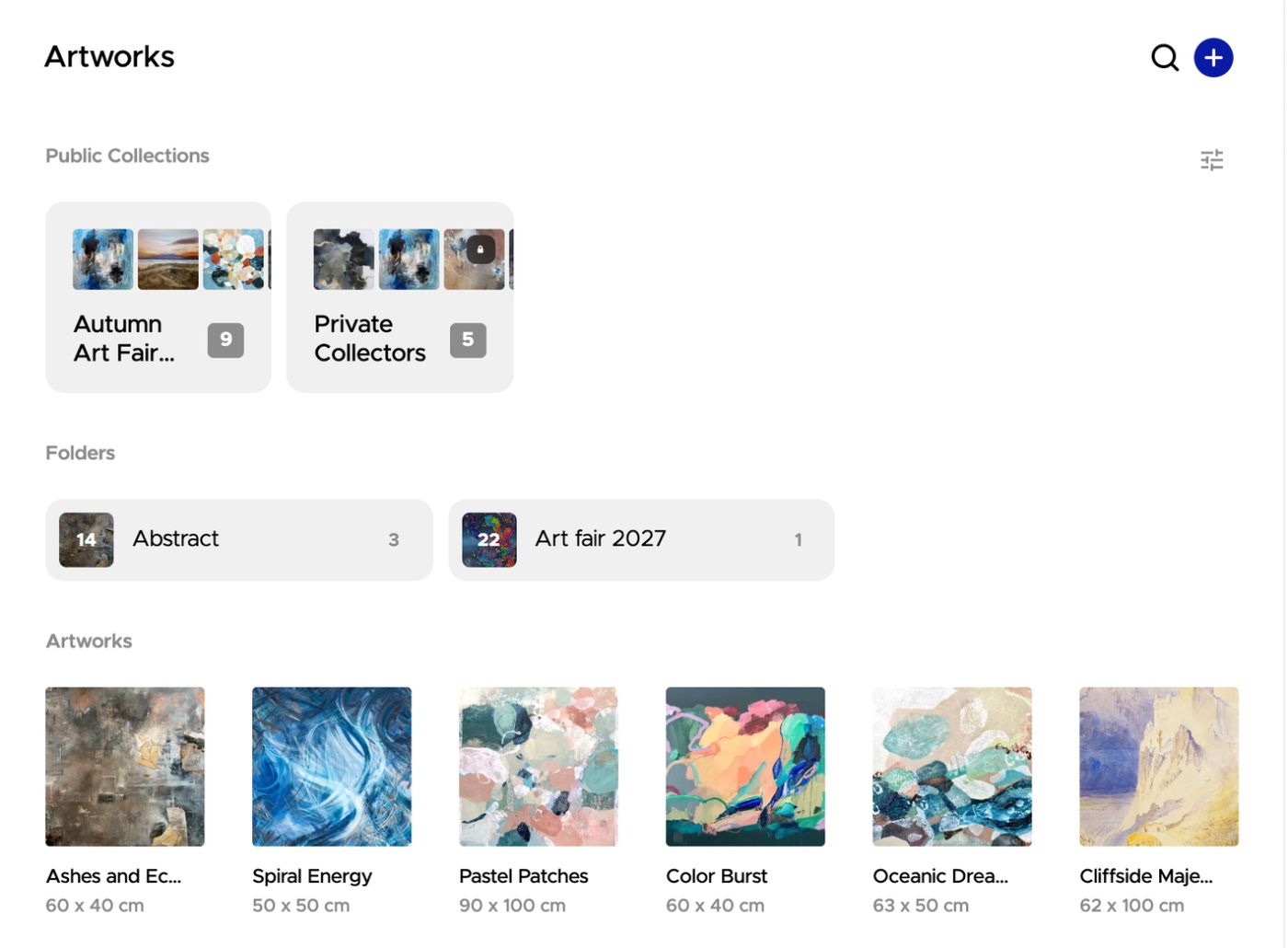

Organize
Folders that fit your work
By series, year, medium or client.
Sort your work into folders, and put folders inside folders as your library grows. Select several artworks to move them together or start a new folder from the selection. Search by title to find any piece in seconds.
Start for free

Collections
Share only what you choose
For a gallery pitch, a client or a show.
A collection is a hand-picked set of artworks with its own link, right at the top of your library. It stays offline until you switch it on, and visitors can contact you by email, WhatsApp, Instagram, Messenger or Telegram. Let them browse your other collections too, or on Pro, add a password so only the people you invite can open it.
Start for free

QR codes
A QR code for every piece
A wall label that sends visitors to your work.
Make a QR code for any artwork and print it as a wall label with its name, size and price. A scan opens a page with only that piece and a button to contact you, or your own link, like the Etsy listing. Change where it goes at any time, and printed codes keep working. Sold it? Print a certificate of authenticity to go with it.
See how artists use QR codes at fairs

Scan stats
See what gets scanned
Know which pieces people stop at.
Every scan is counted. See scans and visitors by day or by hour, which artworks get the most attention, how many visitors tapped to contact you and when your stand was busiest. Pick a range, like the days of a fair, and compare it with the time before.
Start for free
Connected
Upload once, use everywhere
One library behind all of Canvy.
Every artwork in your library is ready to place in Room Mockups, show on your Portfolio Website, share in a collection and print on a QR code label, details included, so you only describe each piece once. Change a title or a price, and your website, collections and QR code pages show it right away.
See Room MockupsEvery device
One login. Every device.
Your library, folders and collections are the same on your computer, iPad, iPhone and Android phone. Add a piece in the studio, and it's there when you open the app at a fair.


Everything else
The details that save you time later.
Your records
Keep the information that's easy to lose track of.
- Inventory numbers and private notes
- Creation date, time spent and cost
- Round and cut-out artworks, not just rectangles
- Download your original image any time
Sharing tools
Get your work in front of the right people.
- Wall labels with a QR code, size and price
- Scans, visitors and contacts for every code
- Certificates of authenticity to print and sign
- Switch a collection on or off at any time
Room to grow
Start free and upgrade when your library outgrows it.
- Free: 100 artworks, 1 collection and 10 QR codes
- Plus: 300 artworks, 10 collections and 50 QR codes
- Pro: unlimited artworks, collections and QR codes
- Password-protected collections on Pro
Showing your work at a fair or exhibition? See how artists use QR codes at their shows
“Canvy.com is a time-saving asset, enabling me to create stunning photos in minutes and streamline workflow with efficient organization features.”
Richard Sengupta
All your tools. One subscription.
Most artists pay for six different tools. With Canvy, you don't have to.
Free
$0
Build your catalog, mock up your work, and share your first portfolio site.
- Up to 100 artworks
- 20 room downloads per month
- Not included: Room Style downloads
- Not included: Room videos
- 1 collection
- Portfolio website with 3 subpages
Plus
$15/mo.
$180 /yr.Save 21%Monthly subscription
More room downloads, room videos and collections for a growing practice.
- Up to 300 artworks
- 200 room downloads per month
- 20 Room Style downloads per month
- 5 room videos per month
- 10 collections
- Portfolio website with 10 subpages
Pro
50% off, limited timeNormal price: $32$16/mo.
Normal price: $384$192 /yr.Monthly subscription
Everything in Plus, with unlimited access and a custom domain.
- Unlimited artworks
- Unlimited room downloads
- Unlimited Room Style downloads
- 50 room videos per month
- Unlimited collections, with passwords
- Your own .art, .com or .eu domain
- Cancel anytime
- 14-day money-back guarantee
- No credit card needed for Free
Is it really free?
Yes. Canvy Free includes up to 100 artworks, one collection and 10 QR codes, and you don't need a credit card. Plus raises that to 300 artworks, 10 collections and 50 QR codes. Pro makes them all unlimited and adds password-protected collections.
Who can see my artwork?
Only you. Your library is private, and a collection stays offline until you turn it on. Even then, only people with the link, and the password if you set one, can see it. A QR code shows only the artwork it was made for.
What if I change the link after printing a QR code?
The printed code keeps working. A code can open a page with only that artwork or your own link, like an Etsy listing, and you can change it at any time without printing it again. Switch a code off, and a scan shows that it's no longer active.
Does it work on my phone?
Yes. Your artworks, folders, collections and QR codes are the same in the Canvy app for iPhone, iPad and Android and on the web.
Can I use my artwork in mockups and on my website?
Yes. Every artwork in your library is ready to use in Room Mockups and on your Portfolio Website, so you only upload and describe it once.
Ready to get your artwork in order?
Upload one artwork and see how simple an organized studio can be. Free to start, private from day one.